Cross-glove
Manus, Wuji, and Qineng gloves share one normalized EMF interface.
GHR maps multiple glove sources and people into one 21-point human-hand representation, then retargets that motion across dexterous robot hands. The same interface accepts VR tracking and video-derived hand keypoints.
Manus, Wuji, and Qineng gloves share one normalized EMF interface.
Person- and hand-specific calibration maps each wearer into the same 21-point hand representation.
Robot profiles retarget the shared hand motion to multiple dexterous-hand kinematics.
VR tracking and video-derived 21-point keypoints can enter Retargeter through the same human-hand boundary.
| Device class | Currently supported devices | Selection |
|---|---|---|
| Data glove | Manus · Wuji · Qineng | GLOVE_SOURCE=manus|wuji|qineng |
| VR | Meta Quest through XRoboToolkit/OpenXR | uv run teleoperater quest |
| Video / keypoints | MediaPipe-compatible metric 21-point hand motion | uv run retargeter --hdf5 <file_path> for HDF5 |
| Robot hand | Wuji · Wuji 2 · Sharpa | Set ROBOT to a supported code |
The public interface is organized around three focused tools. Each stage has one job and a stable output for the next stage.
Single-stage calibration identifies wearer- and glove-specific hand geometry once, then saves a reusable profile.
uv run caliber
Tracker maps normalized glove observations into metric, person-aware 21-point human-hand motion.
uv run tracker
Retargeter converts shared human motion from Tracker, VR, or video into targets for supported robot hands.
uv run retargeter
Tracker produces live 21-point human-hand motion; Retargeter immediately converts it into robot joint targets in the same process.
uv run teleoperater --rt
Run all commands from the repository root.
Linux, Git, uv, Python 3.11 or 3.12, and a desktop session for visualization. A supported glove and Dora are required only for collection and live --rt modes.
$ git clone <repository-url>
$ cd GHR
$ uv sync
Use uv run for the commands below; activating the environment is optional.
Edit the repository-root ghr.env to select the source, person, hand model, optimizer, side, and robot:
GLOVE_SOURCE=manus
GLOVE_PERSON=<person-id>
GLOVE_MODELING=3-2-1-thumbCMCUp
OPTIMIZER=autodiff
HAND_SIDE=right
ROBOT=wuji2
For a one-off run, override a value inline: HAND_SIDE=left uv run caliber.
Download the captures, calibration results, and robot assets selected by ghr.env. The command also handles datasets published under the legacy calibration directory name.
$ uv run demo-data fetchWith a fetched or collected calibration session:
# Calibrate and inspect.
$ uv run caliber
$ uv run viz

# Replay, export, and retarget.
$ uv run tracker
$ uv run tracker --save
$ uv run retargeterCaliber turns static EMF pose captures into a verified, person-specific 21-point skeleton used by runtime Tracker IK.
Each glove adapter provides raw_device_data with shape (2, 6, 7): five fingertip EMF RX poses and one independent EMF TX/palm reference row for each side, stored as xyz + wxyz.
Set GLOVE_SOURCE, GLOVE_PERSON, and HAND_SIDE first, then launch the collection UI:
$ uv run collect

# Optional one-run overrides:
$ uv run collect <person-id> --source manus --hand left| # | Pose key | How to hold the hand |
|---|---|---|
| 1 | flat | Flat on a desk, fingers together. |
| 2–5 | pinch_index … pinch_pinky | Touch the thumb tip to each fingertip in turn. |
| 6 | halfbent | Curl fingers II–V halfway between flat and fist. |
| 7 | fist | Curl tightly, keeping fingertips on the palm surface rather than tucked beneath the fingers. |
| 8 | thumb_pinch_mcp | Press the thumb tip onto the finger MCP knuckles. |
| 9 | flat_open | Keep the hand flat and spread all five fingers as wide as possible. |
| 10 | mcp_90 | Bend II–V about 90° at the MCP only; keep PIP/DIP straight and thumb up. |
| 11–14 | pinch_*_extend | Repeat each thumb-to-finger pinch with the target finger extended. |
Match HAND_SIDE to the powered glove. After the static set, record one continuous motion for runtime validation.
If a pinch remains open, adjust the affected finger’s local sensor x offset, save it, and rerun Caliber. Offsets are specific to the source, person, hand, and glove fit.
$ uv run define_tip2rx
$ uv run caliber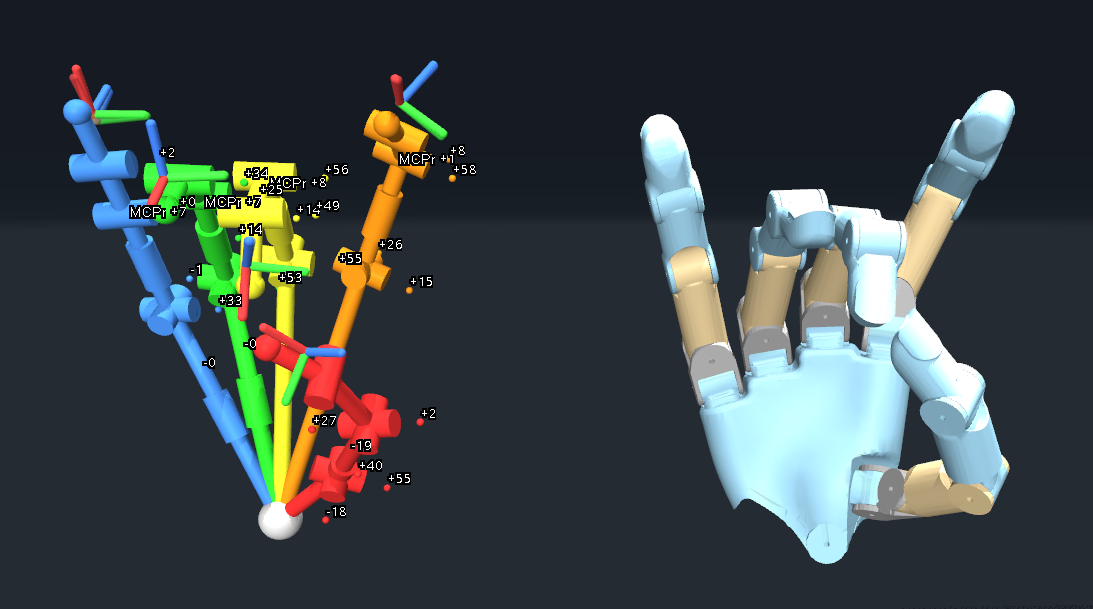
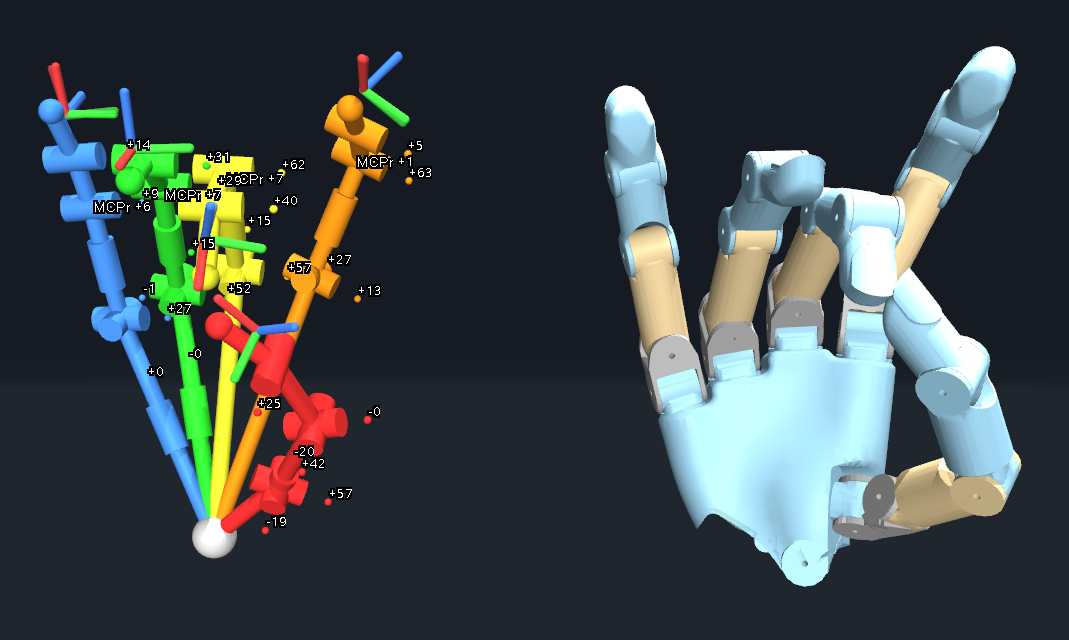
Caliber runs one full-hand joint solve with analytic thumb-CMC coupling.
$ uv run caliberInspect every pose and confirm that predicted RX poses align with the measurements. Then replay continuous motion to check pinch closure and joint stability.
$ uv run viz
$ uv run tracker# Replay and export the human hand.
$ uv run tracker
$ uv run tracker --save
# Retarget a recording or run the composed pipeline.
$ uv run retargeter
$ uv run teleoperater
# Live glove.
$ uv run tracker --rt
$ uv run teleoperater --rtLive commands visualize by default. Only uv run teleoperater --rt --hardware sends commands to a physical robot. Calibrate each glove side independently.
Add left/right kinematic assets, declare a robot profile, register its code, and validate a saved hand motion.
The pipeline uses Pinocchio FK from URDF and Mink/MuJoCo from MJCF, so both representations are required for every supported side.
| Asset | Location | Used by |
|---|---|---|
| MJCF and meshes | data/motion_retargeting/assets/<name>_hand/ | Mink solver and MuJoCo visualization |
| URDF and meshes | data/motion_retargeting/assets/<name>_hand_description/ | Pinocchio forward kinematics |
| Per-side YAML | retarget/config/retargeter/robot/<name>/ | Structural profile and robot geometry |
| Shared defaults | retarget/config/retargeter/common.yaml | Loss and solver defaults for every robot |
Create left/right YAML files under retarget/config/retargeter/robot/<name>/. Define the robot code, finger frames, fingertip sites, coupled joints, palm origin, and hand anchors. Shared solver settings remain in retarget/config/retargeter/common.yaml.
ROBOT_CONFIGS and VALID_ROBOT.Run the geometry editor once per side and save the palm origin, fingertip sites, and hand anchors.
$ uv run define_robot example left
$ uv run define_robot example right$ uv run retargeter path/to/recording.pkl --robot example --hand left
$ uv run retargeter path/to/recording.pkl --robot example --hand rightVerify model loading, joint limits, anchor alignment, stable motion, and pinch closure on both sides before adding a hardware driver.
A new glove is a producer for one normalized EMF pose format. Once the adapter satisfies that contract, collection, Caliber, visualization, and runtime Tracker IK remain source-agnostic.
Every source emits raw_device_data with shape (2, 6, 7).
| Dimension / row | Contract |
|---|---|
| Axis 0 | Two hand slots: left and right. |
| Rows 0–4 | Thumb, index, middle, ring, and pinky EMF RX poses. |
| Row 5 | EMF TX IMU/reference pose; it remains separate from the five RX orientations. |
| Last axis | position xyz in metres plus unit quaternion wxyz. |
| Frame | RX positions in the shared TX-local axes: x forward, y left, z up. |
| Missing sensor | Zero quaternion, allowing downstream IK to freeze that finger safely. |
hardware/glove/collect/<source>_node.py
hardware/glove/dataflows/collect_<source>.yml
hardware/glove/dataflows/realtime_<source>.yml
calib/caliber/utils/<source>_adapt.pyhardware/.wxyz quaternions in the adapter.calib/caliber/utils/glove_sources.py.Measure the fingertip-to-RX offsets for the new source before calibration:
$ GLOVE_SOURCE=<source> HAND_SIDE=left uv run define_tip2rx# Capture the complete static set from the new adapter.
$ GLOVE_SOURCE=<source> uv run collect --source <source> --hand left
# Calibration and inspection use the saved capture.
$ GLOVE_SOURCE=<source> uv run caliber
$ GLOVE_SOURCE=<source> uv run viz
# Only after offline validation: stream the live glove.
$ GLOVE_SOURCE=<source> uv run tracker --rtCheck shape, units, handedness, sensor loss, flat/pinch poses, and continuous motion before enabling live use.
Retargeter accepts metric 21-point human-hand motion from gloves, VR tracking, video, or another pose producer.
uv run teleoperater quest converts OpenXR tracking to the shared 21-point hand and drives one or both robot hands.
Retarget saved 21-point .pkl recordings with uv run retargeter, or play MediaPipe-21 HDF5 directly with uv run retargeter --hdf5 <file_path>.
$ uv run retargeter --hdf5 path/to/recording.h5The HDF5 adapter selects the active HAND_SIDE, uses the active ROBOT, opens the online MuJoCo UI at 30 FPS, loops until the window closes, holds the latest valid pose across invalid detections, and does not save a trajectory.
Start the XRoboToolkit PC Service and Quest client, then run one hand or both hands:
# One hand: ROBOT and HAND_SIDE come from ghr.env.
$ uv run teleoperater quest

# Override the robot and side for one run.
$ uv run teleoperater quest --robot wuji2 --hand right

# Track left and right together.
$ uv run teleoperater quest --bimanual
Use --robot, --hand, --bimanual, and --filter-alpha as needed. Quest mode renders robot targets but does not command physical hardware.
Each frame is a finite (21, 3) array in metres using MediaPipe landmark order. Producers may provide world-oriented raw points or wrist-centred points in the project frame: x forward, y left, z up. Source adapters own scale, handedness, coordinate conversion, confidence filtering, and timing.
Recorded examples of GHR teleoperation across bimanual grasping, assembly, stacking, and in-hand manipulation.
One hand stabilizes the tabletop fixture while the other aligns and twists the light bulb into place.
A teleoperated demonstration of grasping, separating, aligning, and stacking nested paper cups.
Two hands establish a stable cooperative interaction and extract the target cup from its surrounding setup.
Two teleoperated robot hands stabilize, regrasp, and rotate the cube through coordinated in-hand manipulation.
Real-robot policy evidence is presented separately from teleoperated references so execution and demonstration remain unambiguous.
This clip records policy execution of the same task shown in Teleop. Policy identity, checkpoint provenance, outcome annotation, and intervention metadata are still pending, so it is not ranked.
This real-robot rollout uses both hands to extract a thin card from its holder, stabilize it during transfer, and place it on the fixture. Policy identity, checkpoint provenance, success criteria, and intervention metadata are still pending, so it is not ranked.
RW-01 and RW-05 are recorded demonstrations. RW-02 has separate teleoperation and policy-rollout footage. RW-06 is a recorded Rubik’s Cube teleoperation. RW-07 is a real-robot card-extraction policy rollout. Success protocols, policy provenance, and ranking metadata remain pending.
Primary workflow commands use uv run.
uv run collectCapture and average the complete static calibration pose set.hardwareuv run caliberRun the single-stage full-hand calibration with analytic thumb-CMC coupling.offlineuv run vizVerify the active calibration in the browser.offline · GUIuv run trackerReplay EMF motion through calibrated human-hand IK.offline by defaultuv run retargeterRetarget a saved glove- or video-derived 21-point .pkl recording.no glove requireduv run retargeter --hdf5 <file_path>Continuously replay a MediaPipe-21 HDF5 recording in the online MuJoCo UI.loops · no saveuv run teleoperaterCompose Tracker and Retargeter in one viewer.replay by defaultuv run teleoperater quest [--bimanual]Stream one or both Meta Quest tracked hands into Retargeter.live VRThe centralized helpers derive every path from the active tuple. Do not reconstruct a result path by guessing a nearby person or model.
data/caliber/data/
└── <source>/<person>/<hand>/
    ├── all_poses.npz
    ├── <pose>.npz
    └── motion_<timestamp>.npz

data/caliber/results/
└── <source>/<modeling>/<optimizer>/<person>/<hand>/
    ├── params.json
    ├── calibration_result.json
    ├── loss_history.json
    ├── bone_roll_correction.json
└── viz_data.json| Artifact | Role |
|---|---|
all_poses.npz | Namespaced, averaged static-pose measurements for one source/person/hand session. |
params.json | Calibrated parameters consumed by runtime Tracker IK. |
calibration_result.json | Single-stage fit, parameter tables, metrics, configuration, and input provenance. |
loss_history.json | Optimizer convergence history for inspection and comparison. |
viz_data.json | Tuple-specific geometry consumed by the browser visualization index. |
| Symptom | Likely cause | Action |
|---|---|---|
| Session not found | The active source, person, or hand does not own all_poses.npz. | Recheck the six knobs and the exact data directory; do not substitute another profile. |
| Collector buttons stay disabled | HAND_SIDE does not match the powered glove, so the selected row is empty. | Correct the hand side and relaunch collection. |
| One finger fits badly | A pose was held incorrectly, or the wearing-specific tip-to-RX profile is wrong. | Recollect the affected pose and inspect uv run define_tip2rx. |
| Calibration viewer is blank | No matching tuple is indexed, or the browser has no WebGL context. | Read the terminal output, verify the tuple, and use the viewer’s software-WebGL launch path. |
| Replay selects the wrong motion | An implicit assumption was made about the session. | Confirm the active tuple or pass the exact motion_*.npz path explicitly. |
| Robot motion is implausible | The issue may be in retargeter rather than calibration. | First validate tracker alone, then inspect the selected robot profile and retarget YAML. |
teleoperater quest cannot find the SDK | No discovered Python interpreter can import both numpy and xrobotoolkit_sdk. | Pass the SDK environment explicitly with --xrt-python or set QUEST_XRT_PYTHON. |
| Only one bimanual Quest viewer moves | The other Quest hand is not actively tracked. | Make both hands visible to the headset; each side begins independently and holds its last pose while tracking is absent. |
For any questions, contact Wei Pan at weisonweileen@gmail.com.